Designing a plant-care app from a prompt: Leaflet
The real prompt, four screens and review questions behind a plant-care app concept made in CiCrew. See what the design demonstrates and what still needs building.
By Cicrew · Updated
Start with a task someone already forgets
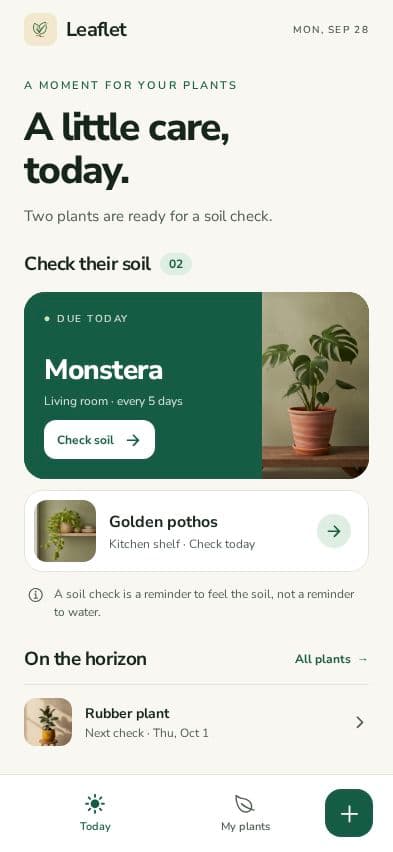
Leaflet is a concept for people who have a few houseplants and forget when they last checked the soil. Its main task is simple: find the next plant to check, record what happened, and be able to look back later.
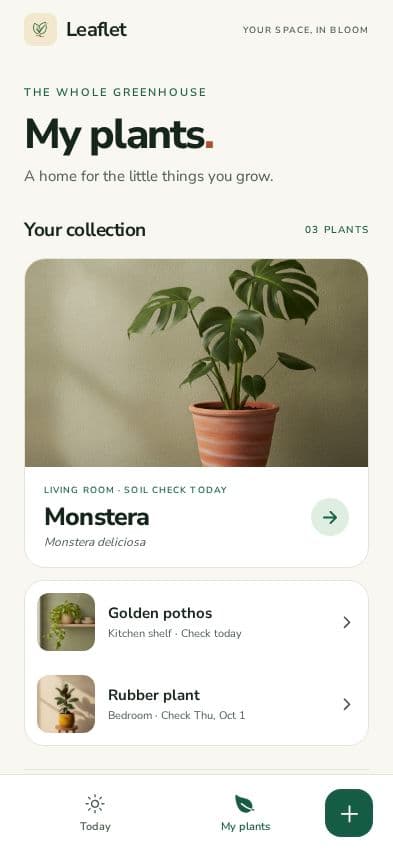
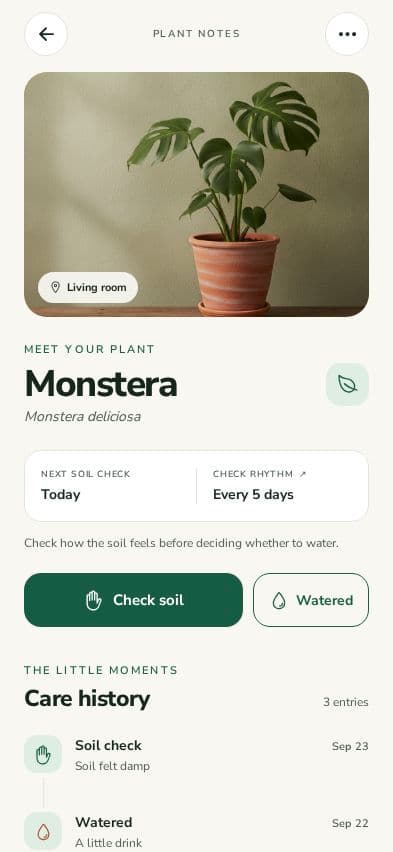
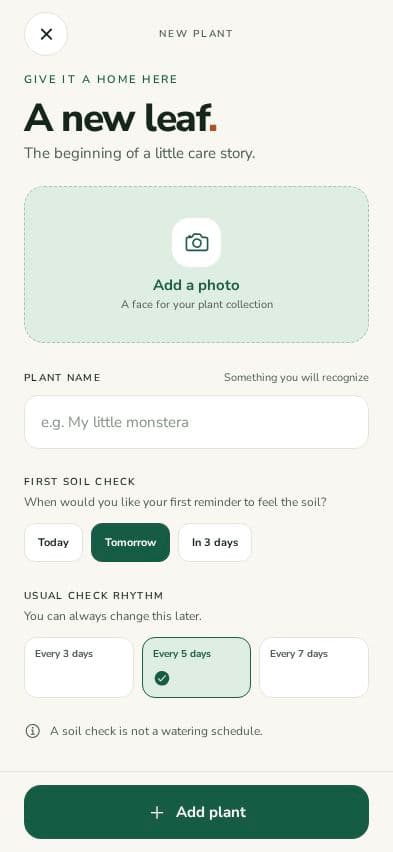
We created these screens in Cicrew on September 28, 2026, using demo data. We completed Idea, Brand and Design, then stopped. These are actual captures of the generated design, not evidence of a finished app, real customers or tested plant-care advice.
The prompt deliberately asks for a soil check before watering. That distinction affects the main button, the supporting text and what a future care log would need to save. A visual style alone would not communicate it.
The exact prompt we used
The prompt names the audience, one main journey, the screens, a visual direction and the work to leave out. You can reuse that structure for a different idea. The instruction to stop at Design was part of this demonstration; it is not a claim that the app was built or published.
Create a mobile app called Leaflet for people with a few houseplants who forget when they last checked or watered them. The main flow is: see today's care tasks, open a plant, log a soil check or watering, and see the updated care history. Include four screens: Today, My plants, Plant details with care history, and Add a plant. Keep watering suggestions adjustable and based on checking the soil, not a promise that every plant needs water on a fixed schedule. Use a warm cream background, deep forest green, restrained lime accents, readable typography, generous spacing and large plant imagery. Use clearly fictional demo plants and care history. This is a CiCrew marketing design concept. Complete Idea, Brand and Design so we can capture real screens; stop before Plan, Build, payments or publishing. No live notifications or external integrations are needed for the design.
Four screens to review together
The cream background, forest green actions, rounded surfaces and plant imagery repeat across the concept. Review them as one journey: a person should recognize the same plant and understand the next action on each screen.
How to review the design before building
Read each screen at phone size. Start at Today and ask where you would tap to record a soil check, then where you would expect the result to appear. If the answer depends on explaining the interface aloud, revise the design first.
Next, review a person with no plants. The four captures use sample data, so they do not establish that the empty collection, failed save, keyboard or accessibility behavior works. Those need explicit design and implementation checks.
- Make checking and watering separate, understandable actions.
- Keep plant names, imagery and status labels consistent between screens.
- Ask for an empty collection and the state after the first plant is added.
- Plan a visible save confirmation and a way to correct an accidental care entry.
What remains before this becomes an app
A build would need persistence for plants and care events, input validation, and tests for the main journey. A useful test is to add a plant, record care, close the app and reopen it to confirm the saved history remains correct. Notifications and external integrations were excluded from this concept.
Before a store release, test an installable build on real devices and complete the publishing requirements. If paid features are added, their value and purchase behavior need separate validation. A polished design does not establish that anyone will pay for the product.
We did not measure a reliable per-concept cost or elapsed generation time. The workspace had other activity, so its balance difference cannot be used as a price for reproducing these screens.
Keep planning your app
- Designing a packing-list app with AI: Packlight
- Designing a reading tracker from a prompt: Chapter
- Mobile app prompt examples: describe a useful first version
- Mobile app launch checklist: from a working build to release
- How to publish an AI-built app to the App Store and Google Play
- What does it cost to build and run an app with AI?
- Your app, your accounts: code, databases and environment setup